The multicam that cuts itself to whoever's talking.
Drop your raw cameras and recorders — or a Final Cut multicam. Speaker Cut syncs them, switches the edit to whoever's speaking, transcribes every word, and hands back a finished Final Cut timeline — in minutes, on your Mac.
One video in.
Highlights out.
No multicam and no separate mics — just the recording. A Zoom call, a StreamYard export, a phone on a tripod. Highlight Cut tells the voices apart, works out who's who, writes the transcript, and pulls highlights that tell a complete story.
- Knows who's talking. It separates every voice and names each one from the conversation. Pick your show profile and your hosts are named and spelled the way you saved them.
- Fix speakers like a doc. Click a name to reassign a line and Speaker Cut offers to fix the ones that sound the same. Click a word and press Enter to split a line. Tap Space to hear any moment.
- Highlights with a beginning, middle and end. The setup, the turn and the payoff — stitched from anywhere in the episode, starting and ending on whole sentences.
- Shows its reasoning. Takes direction. Every pick explains why those lines made it. Ask for “three lines from the guest” and Speaker Cut checks it's really the guest talking.
A single .mp4, .mov or .wav · voices and transcript processed on your Mac · Read the guide →
Drop your clips. Get a finished edit.
Three steps, no round-trip through Final Cut first — Speaker Cut builds the multicam itself. No plugins, no timeline scrubbing.
Drop your clips
Drag in your cameras and audio recorders — Speaker Cut listens, syncs them by audio, and assembles the multicam for you, ATEM splits and external recorders included. Already built one in Final Cut? Drop the .fcpxml instead. Either way it reads each camera's isolated mic to know exactly who's talking. No diarization, no guesswork.
It cuts to the speaker
Per-mic voice detection follows the conversation — the video switches to whoever's speaking, holds through pauses, and cuts wide on overlaps. Turn on auto-mix and each mic gets editable volume keyframes that open only while its owner is talking — mic bleed gone — and every word is transcribed and credited to its speaker.
Notes, highlights & export
With Speaker Cut One or Pro, AI pulls your best highlights and cold-open hooks — rate them, lock keepers, re-roll the rest. Then bundle the FCPXML, transcript & notes into one zip, or import straight back into Final Cut.
Everything a talking-head edit needs.
Builds the multicam for you
Drop raw cameras and recorders and Speaker Cut syncs them by audio into a multicam — no assembling it in Final Cut first. Handles ATEM shoots that split into multiple clips per angle.
Any number of cameras
Two speakers or a ten-person panel — as long as each has an isolated mic, on-device voice detection attributes every line without cloud diarization.
Word-perfect transcript
Every line attributed to the right person — from each camera's mic, or from a single recording with Highlight Cut. Export it as text or .srt captions.
Studio audio, automatically
Auto-mix lays each mic on its own lane with editable volume keyframes that open only for their owner — judged by level, by the words on each mic, and by each person's voice. Mic bleed and room tone go, reactions stay, nothing is baked in.
AI highlights & hooks
Clips that tell a complete story, plus cold-open soundbites, pulled from the transcript. Every pick explains itself — rate, lock, or re-roll with a note until it's right.
Private by design
The sync, the cut, the transcript and the auto-mix all run entirely on your Mac. Your footage is never uploaded anywhere.
Film to a camera, record to a recorder.
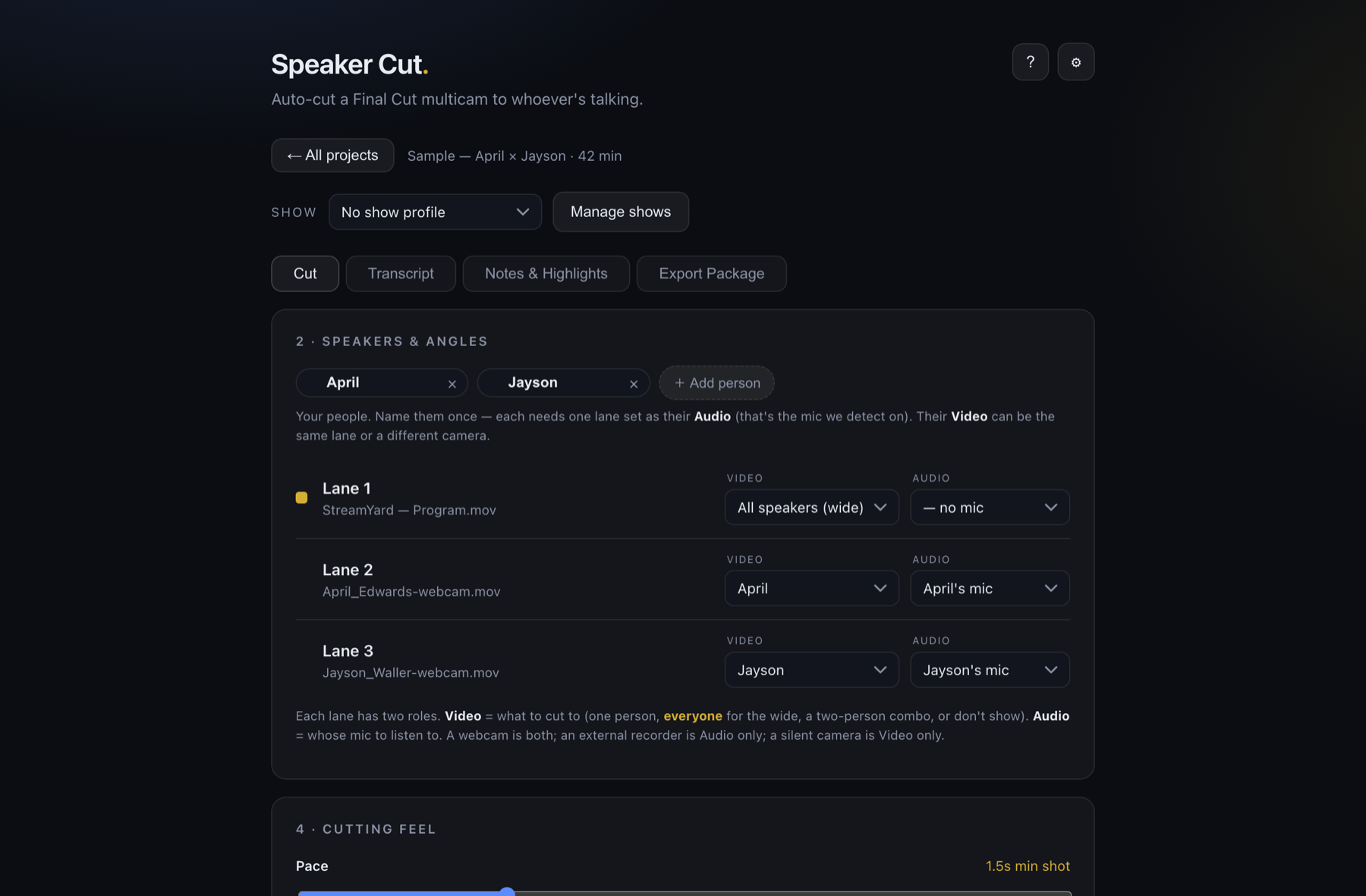
Speaker Cut syncs every camera and external recorder into one multicam by their audio — so it can detect each speaker on their clean recorded track while cutting the video to their camera. Set each lane's Audio and Video independently: a webcam does both, a field recorder is audio-only, a silent camera is video-only.
It cuts to whoever's talking. Automatically.
Speaker Cut reads every mic, hard-cuts the program to the active speaker, and lays down a finished multicam edit — while you watch.
Your whole post workflow, in one window.
Drop a multicam and Speaker Cut takes it from raw angles to a finished, publish-ready package. Here's the actual app.
Cut to whoever's talking
Assign each speaker's video and audio lane — a webcam is both, an external recorder is audio-only. Speaker Cut switches the edit automatically.
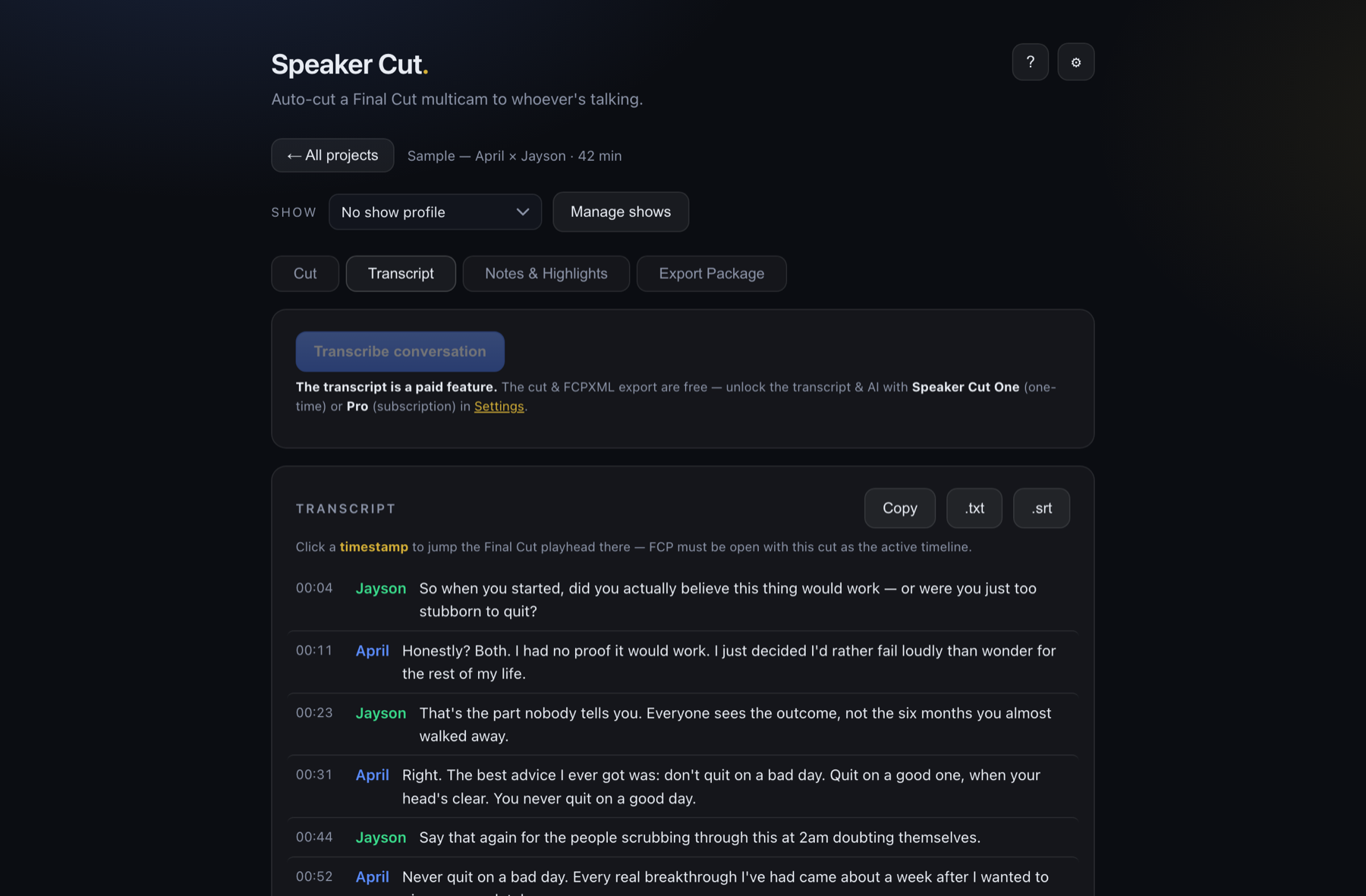
Every word, speaker-labeled
On-device transcription tags each line to the right person. Download it as text, or as .srt captions.
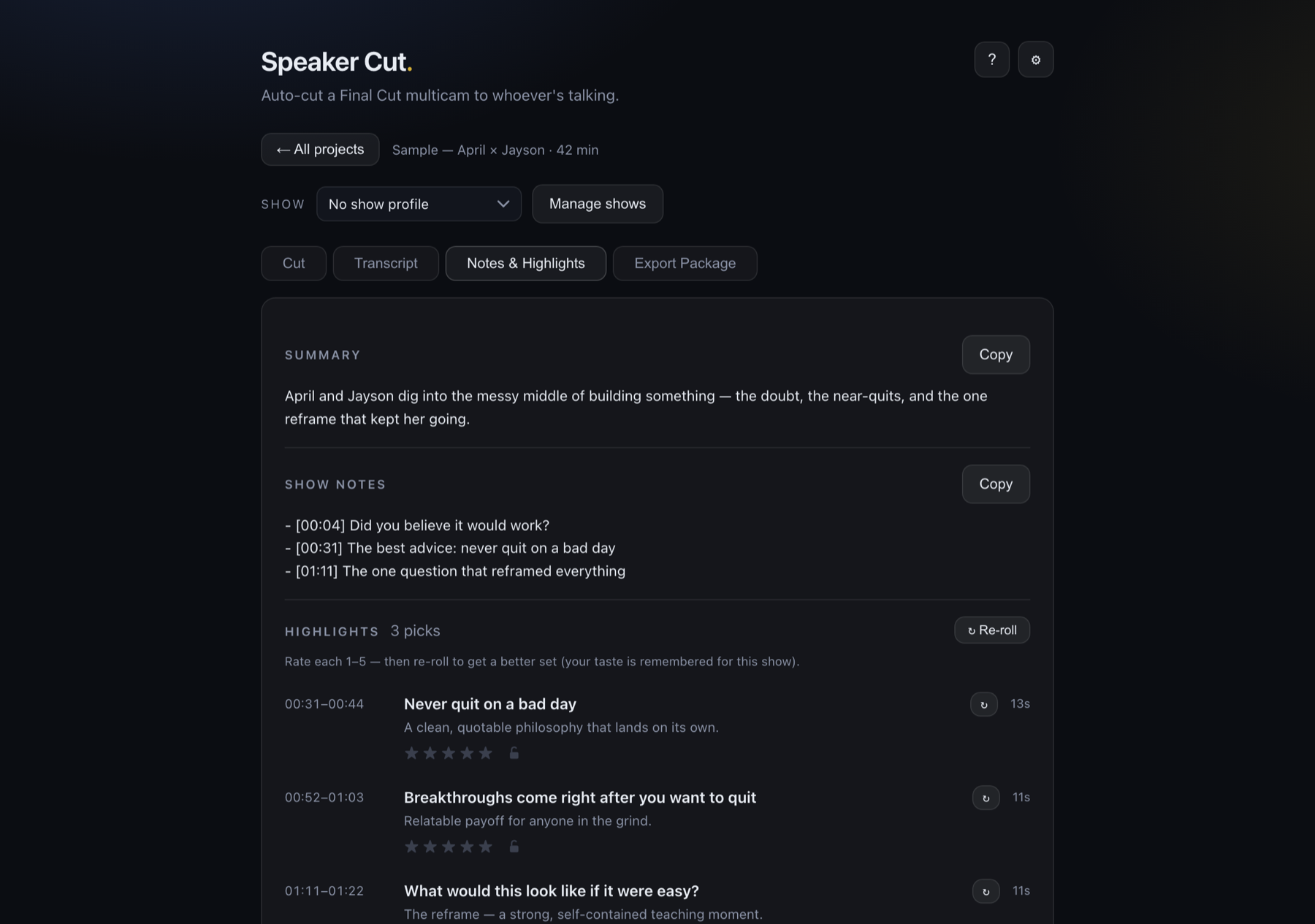
Show notes, highlights & hooks — written for you
AI turns the transcript into a summary, timestamped show notes, and rated highlight and cold-open picks you can re-roll to taste.
Free to cut. Unlock the transcript & AI.
The app, the multicam builder, the speaker-cut and the Final Cut export are free forever. The transcript, AI show notes, Highlight Cut, and auto-mix audio are the paid layer — buy it once, or subscribe.
Speaker Cut
The full editing engine. No account, no key.
- {c}Auto speaker-cut multicam
- {c}Export package for Final Cut
- {c}Levels & clipping meters
- {x}Auto-mix audio (keyframed mic lanes)
- {x}Full transcript + SRT
- {x}AI notes & highlights
- {x}Highlight Cut — highlights from one video
Speaker Cut One
Unlock AI for good. On-device free, or your own key.
- {c}Everything in Free
- {c}Full transcript + SRT
- {c}AI show notes, highlights & hooks
- {c}Highlight Cut — highlights from one video
- {c}Auto-mix + deep clean — keyframed mic lanes, no bleed
- {c}Free on-device AI (macOS Tahoe)
- {c}…or bring your own Anthropic / OpenAI key
- {c}Licensed for one Mac — move it anytime
Speaker Cut Pro
Zero setup. We host the best cloud AI for you.
- {c}Everything in Free
- {c}Full transcript + SRT
- {c}Hosted premium AI — no key
- {c}Highlight Cut — highlights from one video
- {c}Auto-mix + deep clean — keyframed mic lanes, no bleed
- {c}Works on any macOS, no Tahoe needed
- {c}Generous monthly generation quota
- {c}Licensed for one Mac — move it anytime
One-time and subscription both unlock the transcript & AI — pick how you'd rather pay.
Good to know.
Does it work with Final Cut Pro?+
Do I have to build the multicam in Final Cut first?+
What if I only have one recording, with no separate mics?+
Do I need an internet connection or an API key?+
Is my footage uploaded anywhere?+
I'm not on macOS Tahoe yet. Can I still use the AI?+
How does licensing work across my machines?+
Stop cutting multicams
by hand.
Download Speaker Cut free and turn your next interview into a finished edit before your coffee's cold.